

Lecture recorder · AI note taker
Record the lecture. Get the notes.
Ask your teacher first, then hit record. Tap This matters or Lost me as it happens. After class Nightsesh writes your notes: the big ideas, what your teacher stressed, what’s due, and every moment you got lost, explained step by step.
AI notes
Every lost moment, explained.
Tap it in class. Read it after. Hear that moment again with one tap.
-
AI notes
Tap as it happens. Read it after.
Ask your teacher first, then tap Record class.
- Tap as it happens. This matters. Lost me. Snap the board.
- Every lost moment, explained. Step by step, after class.
- What your teacher stressed. Plus what’s due, the big ideas and charts.
- Hear it again. Tap ▶ on any moment of class.
- Then study it. Make flash cards and study cards from that class, Quiz me, turn it into a walk, or talk it through.
- The audio stays on your phone. What’s said is written down right on your device.
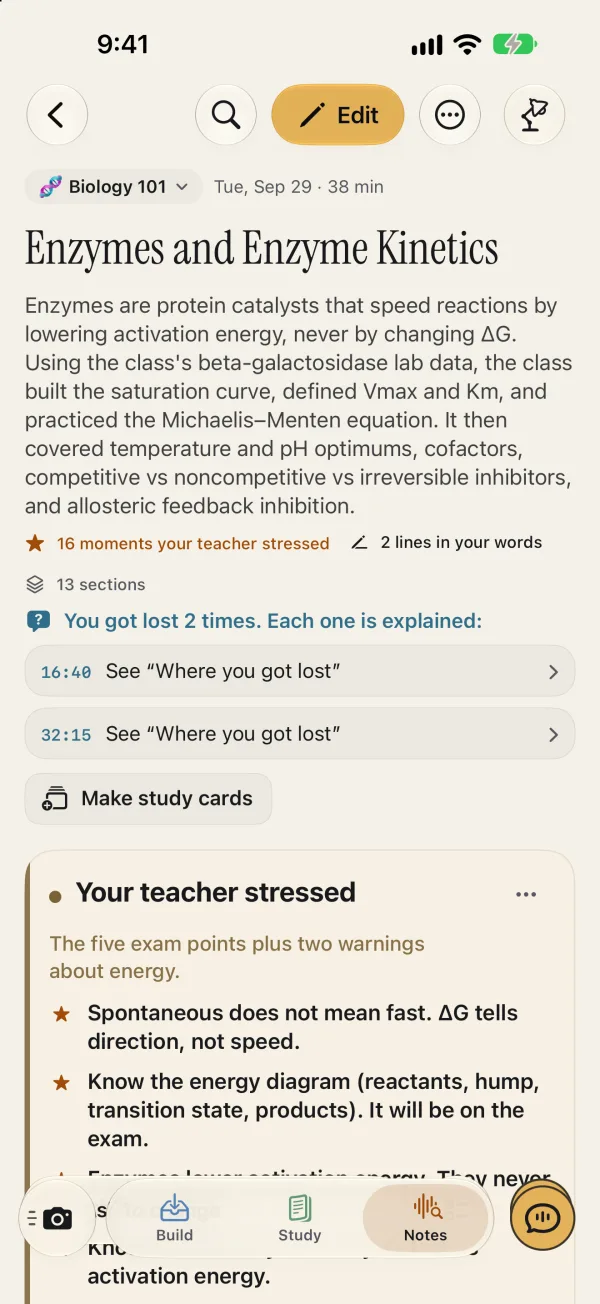
Enzymes and Enzyme Kinetics
Enzymes are protein catalysts that speed reactions by lowering activation energy, never by changing ΔG. Using the class's beta-galactosidase lab data, the class built the saturation curve, defined Vmax and Km, and practiced the Michaelis–Menten equation. It then covered temperature and pH optimums, cofactors, competitive vs noncompetitive vs irreversible inhibitors, and allosteric feedback inhibition.
16 stressed2 your jots13 sections
? You got lost 2 times. Each one is explained:
16:40Your teacher was explaining what Km says about binding…
32:15Your teacher was introducing noncompetitive inhibition…
Where you got lost AI explained16:40 · you tapped Lost me
Your teacher was explaining what Km says about binding: a low Km means the enzyme holds its substrate tightly (high affinity).
1Km is the substrate concentration where the rate reaches half of Vmax.
2So Km answers: how much substrate does this enzyme need to get to half speed?
3If only a little substrate is needed, the enzyme must be catching substrate easily, so it binds tightly. Small number = high affinity.
4If a lot of substrate is needed, the enzyme holds on loosely and lets go often. Big number = low affinity.
e.g. Enzyme A has Km = 0.1 mM; enzyme B has Km = 10 mM. At 0.1 mM substrate, A is already at half speed while B has barely started. A has the higher affinity.
Your teacher stressedSpontaneous does not mean fast. ΔG tells direction, not speed. ▶ 2:00
Enzymes lower activation energy. They never change ΔG or the equilibrium. ▶ 5:30
Low Km = high affinity. High Km = low affinity. ▶ 17:00
Free energy and activation energyΔG says if a reaction can go; activation energy decides how fast.
ΔG Change in free energy. Negative ΔG = exergonic: releases energy, spontaneous. Positive ΔG = endergonic: needs an energy input.
e.g. Oxidizing glucose fully to carbon dioxide and water: ΔG ≈ −2870 kJ/mol. Very spontaneous.
Spontaneous does not mean fast. ΔG shows which direction a reaction can go, nothing about its speed.
Playing the class at 2:00
“Spontaneous does not mean fast. I want you to write that down…”
Saturation, Vmax and KmRate rises with substrate, then levels off when every enzyme is busy.
Beta-galactosidase rate vs substrate concentration (class lab averages)
The rate climbs steeply then levels off toward Vmax (about 80), and galactose slows it at low substrate while the curves come together at high substrate.
The Michaelis–Menten equationPlug in Vmax, Km and [S] to get the rate; it never exceeds Vmax.
V = Vmax × [S] / (Km + [S])Ask to change…Quiz me
Close
Question 2 of 5
An enzyme has Vmax = 120 µmol/min and Km = 2 mM. What is the reaction rate when [S] = 6 mM?
A90 µmol/min
B40 µmol/min
C120 µmol/min
D60 µmol/min
✓ Right
V = Vmax × [S] / (Km + [S]) = 120 × 6 / (2 + 6) = 90. This also fits the shortcut: [S] = 3 × Km gives 3/4 of Vmax. Computing Vmax/Km gives 60, and forgetting to add Km gives Vmax itself, which are the common mistakes.
Next question
Then turn it into flash cards.
Your notes are the start. One tap makes flash cards and study cards from that class.
Flash cards from that class
Written from what your teacher said, checked against it, with spaced repetition. How the flash cards work.
Talk it through
Ask the tutor about the class. It answers from your notes and shows you the part it means, highlighted.
Snap the board, jot a word
Photos and jots made while recording land at that moment in the notes.
The audio stays on your phone
What’s said is written down right on your device. The class audio isn’t uploaded.
Questions
Is my class recording uploaded?
No. A class recording is turned into text on your iPhone or iPad. The audio isn’t uploaded. The text goes to our AI to write your notes.
Am I allowed to record my class?
Ask your teacher first, and follow your school’s rules. Nightsesh asks you to confirm you have permission once for each Subject before you record.
What do the notes include?
The big ideas, definitions, what your teacher stressed, what’s due, charts when the class had numbers, and a step-by-step explanation of every moment you tapped Lost me. Tap ▶ on any moment to hear that part of class again.
Can I turn my lecture notes into flashcards?
Yes. Every note can become flash cards and study cards from that class, or a Quiz me, a walk, or a conversation with the tutor.
Can I add photos of the board while recording?
Yes. Snap a photo during class and it lands at that moment in the class’s notes. Jot a word or two the same way.
Do I need internet?
Recording, and turning the audio into text, happen on your device. Making the notes, flash cards and AI help needs an internet connection.

Up late? Same.
It’s time to lock in.
- iPhoneReady now
- iPadReady now
- MacComing soon
See everything Nightsesh does on the home page.
The animation is simplified; the screens show the real iPhone app with a sample class. AI can make mistakes. Check notes and explanations against your class. Making notes needs an internet connection and available allowance. Recording a class is your responsibility: follow your teacher’s and school’s rules.